The Background
I produce a monthly satellite broadcast show for one of my clients focused on informing, developing, and motivating their statewide employees (see some production shots at my flickr site). The final showreel is assembled from segments and stand-up shoots developed by multiple producers. We end up interviewing roughly 10 different employees, highlighting multiple divisions & programs, and visiting roughly 6 different locations during the month's production. Naturally, sharing information quickly, timely, and effectively is key to keeping everyone (Client, Production Crew, & myself) on schedule, on budget, and focused on producing a cohesive and high-quality end product.
The Story
My first step to improve coordination of the production for the client was to develop a Google Apps site. I learned a few tricks from my own personal projects on how to setup wikis, schedules, simple databases, and published documents using Google Apps, so I was eager to apply the knowledge. We needed one central location to store and display all information relating to each month's production. It also needed to be easily accessed and updated by all involved with the production. So, I began development.
I started by brainstorming a running list of features that I knew from experience the site could provide and that were relevant to the production needs.
- Multiple Calendars with customized viewing and updating features
- Centralized communications platform allowing message posts, comments, idea log, and concern record.
- Online location for documents (Word, Excel, Powerpoint, PDF)
- Ability to web publish and update simple spreadsheet databases
Of course, the site will not meet all needs and will never replace traditional communication tools, but it addresses some of the key challenges of coordination and rapid information sharing.
The Status

Thus far, I have deployed about 25% of the planned solution. We are currently using a published spreadsheet to summarize each month's production plan. The client, producers, and crew can view the month's plan from any browser. Key production personnel can update the plan via a web form or a form embedded in an email. The summary sheet automatically updates with the most current information. This may not seem like much, but read below if you want to learn some of the challenges developing this deceptively simple spreadsheet solution.
Developing the Monthly Production Summary Sheet in Google Spreadsheets

In a nutshell, it was difficult. I knew I wanted a summary sheet on the web that did not require my constant maintenance and updates. I also wanted a solution that only a few key people could update, but viewable by many. Here are some lessons I learned:
1. Google spreadsheets allow only one form per file.
My initial plan was to use one file with sheets for each month and one master sheet showing a summary of the entire year. Neat, clean, and simple. Well...since only one form was allowed per file, the necessary update form would have been huge, thus I had to split it up. Each month needed its own spreadsheet file saved in Google Docs.
2. Google Forms are thus far not customizable
They are functional, but they do not look pretty, and currently you cannot customize the look or layout.
3. Forms for updating and adding information to Google spreadsheets require their own sheet within the file.
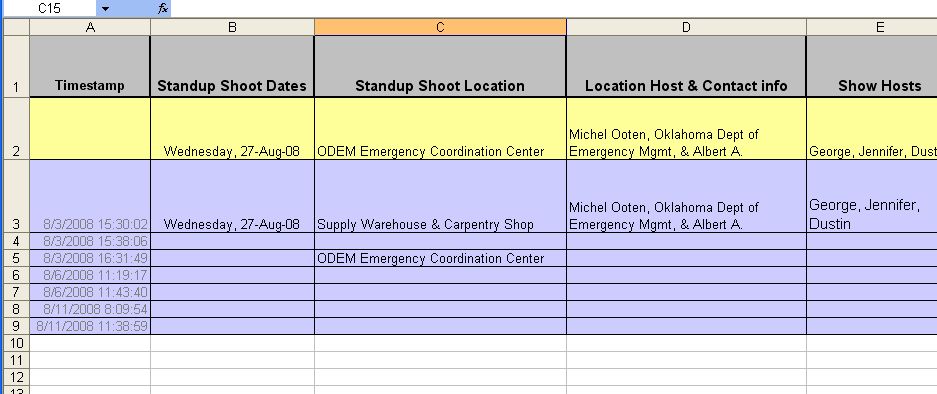
Data inserted into sheets via a form require a horizontal orientation and are quite ugly. I wanted my summary sheets in a more condensed readable format (vertically alligned). So, I gave the form its own sheet. When information is submitted via the form, it is added to the sheet in the lowest empty row. The summary sheet displays only the most updated production information in the form sheet.
- Production updates submitted via a forms into this sheet
4. The spreadsheet formula to display the last entry in a column should have been easier to develop (I blame both MS & Google)
So, in order for the Summary Sheet to display only the most recently updated information, I needed it to pull values from one row in the Form Sheet. The cells in that one row needed to display only the most recently updated information in each column. After a few hours of research & experimentation, here is the formula I developed:
=ARRAYFORMULA(OFFSET(A1,INT(MAX(NOT(ISBLANK(C3:C200))*(COLUMNS($B1:$IW1)*ROW(C3:C200)+COLUMN(C3:C200)))/COLUMNS($B1:$IW1))-1.0,MOD(MAX(NOT(ISBLANK(C3:C200))*(COLUMNS($B1:$IW1)*ROW(C3:C200)+COLUMN(C3:C200)))/COLUMNS($B1:$IW1),1.0)*COLUMNS($B1:$IW1)-1.0))
This formula is placed in each cell in the 2nd row of the Form Sheet (with some adjustments to each formula based on location). It returns the last non-blank value in the column.
To Be Continued...
I will update you occasionally as I make more progress on this project.


 Posts
Posts


